The Best Free AI Tools for Marketing 2026 : How to Scale Your Strategy Without Blowing Your Budget
Table of Contents
You know the feeling. It’s Sunday evening, and instead of winding down, your mind is racing. You’re staring at the ceiling, dreading the moment you have to open your laptop on Monday morning. The content calendar is looking worryingly empty, the engagement numbers from last week were lukewarm at best, and your boss—or your client—is asking for “more volume” with the same zero-dollar budget.
It’s the modern marketer’s quiet crisis. You are expected to be a data scientist, a graphic designer, a copywriter, and a video editor all at once. The pressure to produce viral hits daily is relentless, and doing it all manually is a one-way ticket to burnout.
But here is the good news: you don’t have to do it alone, and you certainly don’t need an enterprise-level budget to get enterprise-level help. The landscape has shifted. We aren’t just talking about clunky automation anymore; we are talking about sophisticated AI marketing assistants that live in your browser, ready to work for free.
This guide isn’t just a list; it’s your survival kit. We are going to break down the best free AI tools for marketing that will help you reclaim your time, spark your creativity, and finally scale your strategy without spending a dime.
Why Your Toolkit Needs an AI Upgrade in 2025
If you are still writing every tweet from scratch or manually resizing images for five different platforms, you are fighting a losing battle. The sheer volume of content required to stay relevant today is impossible for a single human to manage efficiently.
There is a common misconception that “free” tools are just toys—watered-down versions of software that hold your data hostage until you pay up. While that used to be true, the AI marketing boom has democratized access to powerful technology.
Integrating these tools isn’t about cutting corners; it’s about shifting your energy. When you offload the repetitive, grinding tasks to an algorithm, you free up your brain space for what actually matters: strategy, connection, and storytelling.
Here is why adopting a “free-first” AI approach is the smartest move you can make right now:
- Risk-Free Testing: You can experiment with bold new strategies—like generating AI video or automated newsletters—without having to justify a budget request to finance. If it doesn’t work, you’ve lost nothing but a few minutes.
- Immediate Scalability: Imagine going from writing one blog post a week to five. Or turning that one blog post into ten social media snippets, a video script, and an email blast in under an hour. That is the power of leverage.
- Creative Unblocking: The blank page is the enemy. AI tools act as a collaborative partner, throwing ideas at you until something sticks. It’s easier to edit a bad draft than to write a perfect one from nothing.
Top Free AI Writing Assistants for SEO and Copy
Writer’s block doesn’t care about your deadlines. Sometimes the words just won’t come. Whether you are crafting a 2,000-word pillar page or a pithy two-sentence Instagram caption, having an AI writing assistant is like having an editor sitting on your shoulder, 24/7.
These are the heavy hitters that give you the most value for zero dollars.
ChatGPT (OpenAI)
By now, you’ve heard of it, but are you using it to its full potential? ChatGPT remains the undisputed king of versatility among the best free ai tools for marketing. While the paid version offers advanced reasoning, the free tier (currently utilizing efficient models like GPT-4o mini) is more than capable of handling the bulk of your marketing grunt work.
How to use it effectively:
Don’t just ask it to “write a blog post.” The output will be generic and bland. Treat it like a junior copywriter. Give it context.
- Bad Prompt: “Write a post about coffee.”
- Good Prompt: “You are an expert barista. Write a 500-word blog post about the benefits of cold brew coffee for busy office workers. Use a witty, energetic tone. Include three subheadings.”
Key features for marketers:
- Ideation: Stuck on a topic? Ask for “20 contrarian angles on [your industry].”
- Meta Data: Paste your finished article into the chat and ask it to generate 10 SEO-optimized meta titles and descriptions.
- Repurposing: Feed it a transcript of your latest video and ask it to turn it into a LinkedIn carousel.
Copy.ai (Free Plan)
If ChatGPT is your generalist, Copy.ai is your specialist. This tool is built specifically for marketers. The interface is designed to get you from a blank screen to a finished asset as quickly as possible.
Why it belongs in your stack:
Copy.ai shines when you need short-form copy that sells. Their free plan is generous enough for freelancers or small business owners getting started.
Key Features:
- Templates: They have pre-built templates for almost everything: “Pain-Agitate-Solution” frameworks, Facebook Ad primary text, and cold outreach emails. You don’t have to engineer the prompt; the structure is already there.
- Brand Voice: Even on limited plans, you can often input examples of your writing so the AI mimics your specific tone—whether that’s professional and dry, or quirky and emoji-heavy.
Hemingway Editor (AI Features)
You have written the content, but is it readable? SEO isn’t just about keywords; it’s about user experience. If your sentences are winding and confusing, readers bounce, and Google takes notice.
Hemingway isn’t a writer; it’s a ruthless editor. It highlights sentences that are too complex, adverbs that are unnecessary, and passive voice that weakens your message.
The AI Upgrade:
Recently, Hemingway has integrated AI features that don’t just point out the error—they offer to fix it for you. You can highlight a “very hard to read” sentence and click a button to have the AI simplify it instantly. This ensures your content stays accessible to a broad audience, which is a massive factor in keeping users on your page.
Visual Content Creators: Free AI Image and Video Generators
We live in a visual economy. A post without an image is a ghost. But stock photos are expensive, and hiring a graphic designer for every tweet is sustainable for almost no one. This is where generative AI changes the game.
Canva Magic Studio
Canva was already a staple, but their “Magic Studio” updates have propelled it into the top tier of AI marketing tools. It is the most user-friendly entry point for visual AI.
Best ways to use it:
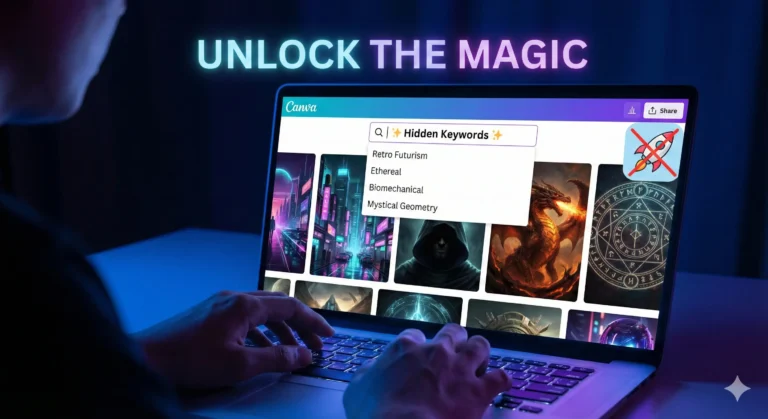
- Magic Media (Text-to-Image): deeply integrated into their design dashboard. You can type “minimalist workspace with a neon blue coffee cup” and get a unique image to drag and drop directly into your Instagram template. No more using the same Unsplash photo as your competitors.
- Magic Edit: Did you take a great product photo but forgot to clean the table? Or maybe you want to change a red rose in the background to a yellow sunflower? You can brush over the area and type what you want to change. It is Photoshop-level magic without the learning curve.
Leonardo.ai
If you need something more artistic or high-fidelity than Canva, Leonardo.ai is your next stop. While tools like Midjourney require a paid subscription and a Discord account, Leonardo offers a robust web interface and a generous daily allowance of free tokens.
Why it stands out:
Leonardo is incredible for creating specific “assets” for your campaigns. Need a mascot for your brand? A futuristic background for your website header?
- Style Consistency: You can choose from fine-tuned models (like “3D Animation Style” or “Photorealistic”).
- Daily Refresh: The free tier resets your tokens daily, meaning if you are patient, you can generate high-quality assets every single day without paying.
Lumen5
Video is the highest-converting medium, but it’s also the hardest to produce. Lumen5 solves the “I don’t have time to edit video” problem. It uses AI to turn text into video.
The Workflow:
You simply paste the URL of your latest blog post into Lumen5. The AI reads your content, summarizes the key points, and overlays them onto relevant stock footage from its massive library. It times the text to the music automatically.
Free Plan details:
The free plan usually includes a watermark and limits resolution to 720p, but for social media stories or quick LinkedIn updates, this is often sufficient. It is the fastest way to repurpose written content into engaging video content.
Smart Social Media Management and Analytics
Creating the content is only half the battle. You have to distribute it and, more importantly, understand if it is actually working. Switching between tabs for LinkedIn, X (Twitter), Instagram, and TikTok is a recipe for distraction.
Buffer (AI Assistant)
Buffer has been a reliable scheduling tool for years, but their AI Assistant has revitalized the platform. It helps you work smarter, not harder.
The AI Advantage:
Let’s say you have a great post for LinkedIn. You can’t just copy-paste that to Twitter; the character count is different, and the tone should be different. Buffer’s AI can take your core idea and “rewrite for Twitter” or “expand for Facebook” with one click.
Free Plan Limits:
Buffer’s free plan is excellent for solopreneurs. It typically allows you to connect up to three channels and schedule 10 posts per channel at a time. For a “free stack,” this is perfect for planning your week ahead every Sunday.
Google Analytics 4 (Intelligence)
Data is scary. Most marketers look at the dashboard and want to cry. Google Analytics 4 (GA4) knows this, which is why they introduced “Analytics Intelligence.”
Your Personal Data Analyst:
This is a search bar inside your analytics dashboard that uses natural language processing. You don’t need to know how to build a custom report or set up a complex filter.
- You can literally type: “Which channel had the highest conversion rate last month?”
- Or: “What are my top-selling products this week?”
The AI parses the data and gives you a direct answer. It also offers “Insights”—automated tips that pop up when the AI detects an anomaly, like a sudden drop in mobile traffic or a spike in user engagement from a specific city.
Comparison of the Best Free AI Tools for Marketing
It can be overwhelming to track which tool does what. Use this quick-reference table to identify exactly which gap in your workflow needs filling today.
| Tool Name | Primary Function | Free Plan Limits | Best Use Case |
| ChatGPT | Content Writing | Unlimited (model dependent) | Ideation, Outlines & SEO Metadata |
| Canva | Design & Visuals | Daily limits on Magic Media | Social Media Graphics & Quick Edits |
| Buffer | Social Scheduling | 3 Channels / 10 posts queue | Content Distribution & Rephrasing |
| Lumen5 | Video Creation | Watermarked / 720p export | Repurposing Blogs into Video |
| Copy.ai | Ad Copy | Word count limits (approx 2k) | Email Subject Lines & Ad Hooks |
| Leonardo.ai | Art Generation | Daily Token Allowance | High-Quality Blog Headers/Assets |
| Hemingway | Editing | Free web version | Readability & Clarity Checks |
How to Build a “Free Stack” Workflow
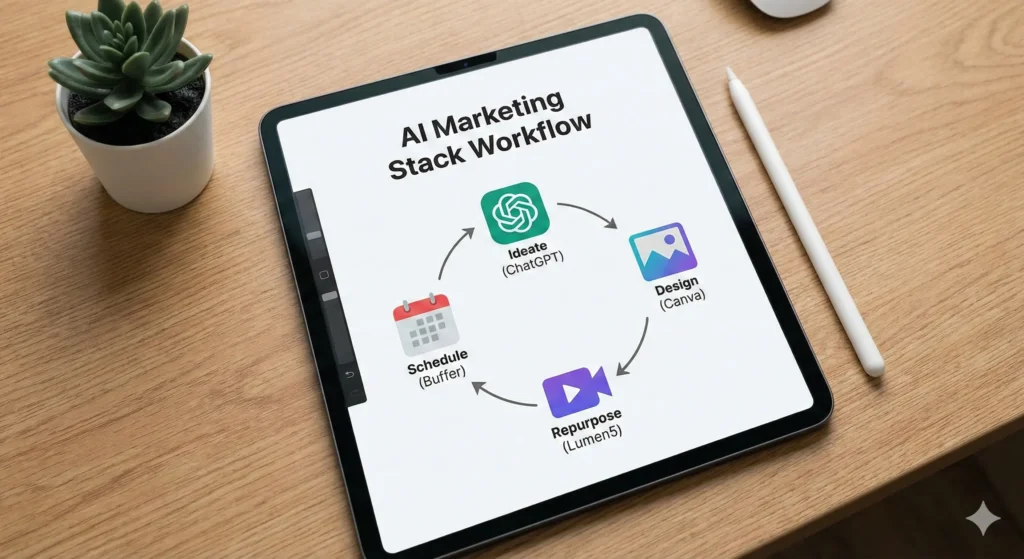
Now that you have the tools, how do you actually use them together? You don’t want to bounce randomly between apps. You need a pipeline. Here is a practical workflow you can use tomorrow morning to create a week’s worth of content in a few hours.
Step 1: The Brainstorm (ChatGPT)
Open ChatGPT. Paste in your company’s mission statement and ask: “Give me 5 blog post ideas that address the pain points of [Target Audience].” Pick the best one. Ask ChatGPT to create a detailed outline.
Step 2: The Draft (ChatGPT + Hemingway)
Write the draft using ChatGPT to expand on the points. Then, copy that text into Hemingway Editor. Fix the red and yellow sentences until the readability grade is around Grade 6-8. This ensures your content is punchy.
Step 3: The Visuals (Leonardo.ai / Canva)
Take the main headline of your article. Go to Leonardo.ai or Canva Magic Media and generate a custom image that visualizes that concept. Download it.
Step 4: The Repurpose (Lumen5)
Take your finished blog text and feed it into Lumen5. Let it auto-generate a 60-second video summarizing the article.
Step 5: The Distribution (Buffer)
Log into Buffer. Upload your video and your image. Use the Buffer AI assistant to write a caption for LinkedIn (professional) and a caption for Instagram (casual) based on the blog content. Schedule them to go out on Tuesday and Thursday.
Result: You have just created a blog, a unique image, a video, and scheduled social posts across multiple platforms. Total cost: $0.
Frequently Asked Questions (FAQ)
It’s natural to have reservations. When you rely on best free ai tools for marketing, you want to be sure you aren’t compromising safety or quality.
Are free AI marketing tools safe for business use?
Generally, yes, but you must be careful with sensitive data. Never paste customer lists, passwords, or proprietary financial data into a public LLM like ChatGPT or Copy.ai. These models may use your inputs to train future versions. For general marketing copy and creative work, they are perfectly safe.
Will using AI tools hurt my SEO rankings?
No, but lazy content will. Google has explicitly stated that their ranking systems reward original, high-quality content demonstrating “E-E-A-T” (Experience, Expertise, Authoritativeness, and Trustworthiness), regardless of how it is produced. If you use AI to generate spammy, unedited text, you will rank poorly. If you use AI to help you write a comprehensive, helpful guide (like this one!), you will be fine.
Can I use AI-generated images for commercial purposes?
This depends on the platform. Canva and Leonardo.ai generally grant you commercial rights to the images you create, even on free plans, but terms can change. Always check the specific Terms of Service for the tool you are using. Avoid using AI to generate images of trademarked characters (like Disney figures) or real celebrities.
What is the best free AI tool for marketing beginners?
If you can only pick one, start with Canva. It touches on almost every aspect of marketing—visuals, video, and even basic copywriting with its Magic Write feature. It offers the most immediate “visual upgrade” to your brand with the shallowest learning curve.
Conclusion: Reclaiming Your Time
The marketing landscape is noisy, and the pressure to shout louder than everyone else is real. But shouting louder isn’t the strategy; speaking clearer is.
The tools we’ve covered—ChatGPT, Canva, Buffer, and the rest—are not magic wands that will fix a broken strategy. They are force multipliers. They exist to strip away the drudgery of formatting, resizing, and staring at blinking cursors.
By building a stack of the best free AI tools for marketing, you are giving yourself permission to stop being a robot and start being a marketer again. You get to focus on the human side of the equation: the empathy, the humor, and the insight that no algorithm can replicate.
Here is your next step: Don’t try to learn all seven tools at once. That’s a recipe for overwhelm. Pick one tool from this list that solves your biggest headache right now. Is it writing emails? Sign up for Copy.ai. Is it graphics? Open Canva.
Set up your free account today and automate just one single task. Your future self—the one actually enjoying their Sunday evening—will thank you.