
How to Build Your First AI Agent: A Step-by-Step Tutorial for Non-Techies (2026 Guide)
Table of Contents
You know that feeling. It’s 2:00 PM on a Tuesday. You have 15 tabs open on your browser. Your inbox is displaying a number that makes your blood pressure spike. You are bouncing between replying to emails, updating a spreadsheet, and trying to remember if you sent that invoice.
You aren’t doing “deep work.” You are just keeping the lights on.
For years, the advice for this problem was simple: “Hire an assistant.” But hiring is expensive, time-consuming, and risky.
Then came the AI revolution. Suddenly, everyone was talking about ChatGPT. But be honest—mostly, you’re just using it as a fancy search engine or a text generator. You ask a question, it gives an answer. It’s helpful, but it doesn’t do anything for you. It doesn’t take tasks off your plate; it just helps you complete them slightly faster.
That stops today.
We are moving past static chatbots. We are entering the era of the AI Agent.
Building an AI agent sounds like something that requires a Computer Science degree or thousands of dollars in software. It doesn’t. In fact, if you can write a clear email and upload a file, you have all the technical skills required to build a digital intern that works 24/7, never drinks your coffee, and doesn’t ask for a raise.
In this guide, you are going to learn exactly how to build your first AI agent from scratch—no code required.
What Exactly is an AI Agent? (And Why Should You Care?)
Before we start glueing tools together, we need to clarify what we are actually building. There is a massive difference between a standard AI tool (like basic ChatGPT) and an AI Agent.
Think of it like the difference between a Calculator and an Accountant.
- A Calculator (Standard AI): It is passive. It sits on your desk waiting for you. If you type “2+2,” it says “4.” If you walk away, it does nothing. It requires your constant input to function.
- An Accountant (AI Agent): It is active and goal-oriented. You give it a stack of receipts and say, “File my taxes.” It knows what to do, what rules to follow, and it completes the process without you hovering over its shoulder.
The “Remote Intern” Metaphor
The best way to think about your new AI agent is as a remote intern.
This intern is incredibly smart (they have read the entire internet), but they have zero common sense and they don’t know anything about your specific business. They don’t know your tone of voice, your pricing, or your rules.
Your job in this tutorial isn’t to write code. Your job is to create the Employee Handbook for this intern. Once you give them the handbook (instructions) and the files (knowledge), they can run on autopilot.
The “Ingredients” You Need Before You Start
You wouldn’t start baking a cake without checking the pantry first. Building an automated agent is no different. You don’t need complex software, but you do need a specific “stack” of tools to make this work.
Here is your recipe for success.
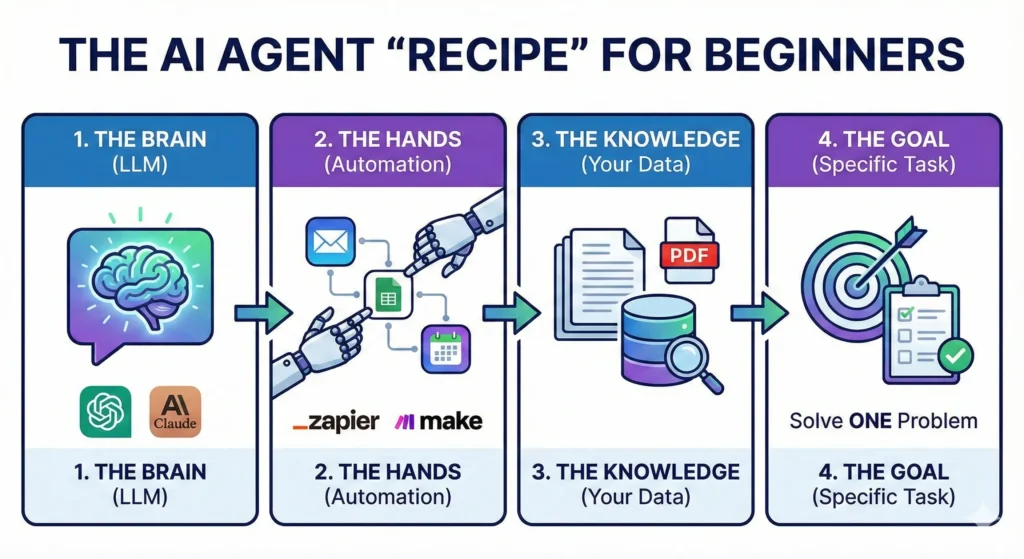
The Automation Recipe Table
| Ingredient (Tool) | Role in the “Recipe” | Cost (Estimated) | Difficulty Level |
| The Brain | Large Language Model (e.g., ChatGPT Plus, Claude Projects) | ~$20/mo | Easy |
| The Hands | Automation Platform (e.g., Zapier, Make.com) | Free – $20/mo | Medium |
| The Knowledge | Your Proprietary Data (PDFs, Spreadsheets, Past Emails) | Free | Easy |
| The Goal | A clear, single problem to solve (e.g., “Sort my emails”) | Free | Easy |
For this tutorial, we are going to focus on the most accessible entry point for non-techies: OpenAI’s Custom GPTs. This allows you to build a contained agent that lives inside ChatGPT but follows your specific rules.
Step 1: Define Your Agent’s “One Job”
The number one reason people fail at AI automation is ambition.
You might be tempted to build an agent that “Running My Entire Business.” You want it to answer emails, write blog posts, post to Instagram, and do your bookkeeping.
That will fail.
AI agents thrive on specificity. If you ask a human intern to “do everything,” they will panic and do nothing well. An AI is the same. You need to pick one specific workflow.
The “Boring Task” Test
To find your first agent idea, look at your calendar from last week. Identify a task that meets these three criteria:
- It happens frequently (daily or weekly).
- It requires data you already have (info is in a document or email).
- It is boring (you dread doing it).
Good Examples for a First Agent:
- “Analyze this spreadsheet of monthly expenses and categorize them.”
- “Take this meeting transcript and turn it into a list of Trello tasks.”
- “Read this customer support email and draft a reply using our refund policy.”
Bad Examples:
- “Make me viral on Twitter.” (Too vague).
- “Write a bestselling book.” (Too complex).
For this guide, let’s build a “Customer Support Drafter.” This agent will take a messy email from an angry customer and draft a polite, policy-accurate response instantly.
Step 2: Choose Your No-Code Platform
Now that we have a job description, we need an office for our agent.
For non-techies in 2026, you generally have two main paths:
Option A: The “Walled Garden” (Custom GPTs)
This is what we will use today. It lives inside ChatGPT. You click “Create a GPT,” and you have a dedicated bot.
- Pros: Zero setup time, no API keys, very cheap ($20/mo subscription covers it).
- Cons: It usually can’t “leave” the chat window (unless you add advanced actions). It gives you text, but you still have to copy-paste that text into your email.
Option B: The “Workflow Builder” (Zapier / Make.com)
This is the advanced tier. This connects apps together.
- Pros: It can actually send the email for you. It moves data from Gmail to Slack to Excel automatically.
- Cons: It breaks easily if you don’t know logic paths, and it can get expensive.
The Strategy: Start with Option A. Build a Custom GPT. Once you trust it to write good emails, then you can graduate to automating the sending part with Zapier later.
Step 3: Writing the “System Instructions” (The Prompt)
This is the most critical step. If the “Brain” is the engine, the System Instructions are the steering wheel.
In a Custom GPT, there is a box called “Instructions.” Most people write two sentences here. That is why their agents suck. You need to write a detailed prompt using the Role-Context-Task framework.
The Role-Context-Task Framework
- Role: Who is the AI? Give it a persona.
- Context: What is the business? Who is the customer?
- Task: What exactly should it do? What are the constraints?
Example Prompt (Copy and Tweak This)
Role: You are an expert Customer Success Manager for “eBookTreasures,” a digital marketplace for authors. You are polite, empathetic, but firm on policy.
Context: We sell digital downloads. Customers often email us claiming they didn’t receive their file, or they want a refund because they didn’t realize it was a PDF.
Task: Whenever I paste a customer email below, you must:
- Analyze the customer’s sentiment (Are they angry? Confused?).
- Check our uploaded “Refund Policy” document to see if they qualify.
- Draft a response.
Constraints:
- Never promise a refund if it has been more than 30 days.
- Use a friendly, professional tone.
- Keep the email under 150 words.
- Sign off as “The eBookTreasures Support Team.”
Do you see the difference? You aren’t just asking for an email; you are giving it a brain.
Step 4: Giving Your AI Agent “Knowledge”
Standard ChatGPT knows everything about the world up to its training cutoff. But it knows nothing about your business. If you ask it about your refund policy, it will hallucinate (guess).
To fix this, we use a concept called RAG (Retrieval-Augmented Generation). In simple terms: we upload files.
In your Custom GPT setup, look for the section called “Knowledge” or “Upload Files.”
What should you upload?
This is where you give your intern their training manual.
- PDFs: Your refund policy, your brand style guide, your employee handbook.
- Excel/CSV: Your pricing list, your product catalog.
- Text Files: Past examples of “perfect” emails you have written. (This is huge—AI mimics style very well).
Pro Tip: Clean your data first. If you upload a messy document with contradictory info, the AI will get confused. Create a clean, simple PDF called “Master Rules for Support” and upload that.
Now, update your instructions from Step 3 to say: “Always check the uploaded ‘Master Rules’ document before answering.”
Step 5: Testing and Refining Your Agent
You have built the bot. You have given it a brain and a handbook. Now, you need to try to break it.
Do not skip this step. If you deploy an untested agent, it might hallucinate a policy that costs you money.
The Stress Test
Open the chat window with your new agent and simulate worst-case scenarios.
- The “Karen” Test: Paste a fake email that is incredibly rude and demanding a refund for a product bought 2 years ago. Does the agent stay polite but firm on the 30-day rule?
- The “Vague” Test: Paste an email that just says “It doesn’t work.” Does the agent ask clarifying troubleshooting questions?
Iterating
Your first draft will not be perfect. It might be too formal, or it might be too long.
- If it sounds robotic: Go back to Instructions and add: “Use casual language. Use contractions like ‘don’t’ instead of ‘do not’.”
- If it misses facts: Go back to Instructions and add: “Read the Knowledge file ‘Pricing.pdf’ step-by-step before answering.”
Keep tweaking until you can trust the output 99% of the time.
FAQ: Common Questions About Building AI Agents
Do I need to know Python to build an AI agent?
Absolutely not. As we demonstrated, tools like OpenAI’s GPT Builder use natural language. If you can type English, you can program the agent. The skill you need is not “coding,” it is “communication.”
How much does it cost to run a personal AI agent?
For the method described in this guide (Custom GPTs), the cost is simply the subscription to ChatGPT Plus (usually $20/month). There are no “per usage” fees or server costs for this level of automation. If you move to API-based tools like Zapier later, costs may scale with usage.
Can my AI agent steal my data?
Security is a valid concern. When you upload files to a Custom GPT, that data stays within the OpenAI ecosystem. If you are on a generic “Free” or “Plus” plan, OpenAI may use interactions to train their models (though you can opt-out in settings). For sensitive business data, consider using ChatGPT Team or Enterprise, which legally guarantees your data is excluded from model training.
What is the best AI agent for beginners?
For absolute beginners, a Custom GPT is the best starting point. It is contained, safe, and easy to edit. Once you are comfortable, you can look into Microsoft Copilot Studio or Zapier Central for more complex integrations.
Conclusion: Your Future is Automated
We have covered a lot of ground. You learned the difference between a tool and an agent. You gathered your ingredients—the Brain, the Hands, and the Knowledge. You defined a specific role, wrote the “Employee Handbook” (instructions), and uploaded the training data.
The agent you built today might seem simple. Maybe it just drafts emails or summarizes meetings. But do not underestimate the compound interest of time.
If this agent saves you 20 minutes a day, that is 100 hours a year.
That is two and a half weeks of extra vacation. That is time you can spend writing your next book, playing with your kids, or just sleeping.
The future of work isn’t about who can type the fastest or who can work the longest hours. It is about who can build the best systems. You are no longer just a worker; you are the manager of a digital workforce.
Ready to build your first agent? Don’t overthink it. Open ChatGPT right now, click “Create a GPT,” and try creating a helper for the one task you are dreading today.
And hey, if you get stuck, drop a comment below or join our community discussions. We’d love to see what you build.