Stop Googling: How to Build a ‘Deep Research’ Agent That Scours the Web for You 2026
Table of Contents
The headache starts around tab number twelve.
You sat down with a simple goal: find the latest statistics on “Remote Work Trends for 2026.” You wanted hard data. You wanted a clear answer.
But two hours later, your browser looks like a crime scene. You have forty-seven tabs open. Your fan is spinning so loud it sounds like a jet engine preparing for takeoff. You are skimming through the same SEO-spam articles you’ve seen a thousand times, trying to find one single nugget of truth buried under a mountain of ads and pop-ups.
You feel that specific kind of burnout—information overload mixed with insight starvation. You are drowning in content, yet you haven’t actually learned anything.
We have all been there. It is the modern tax of doing business online. We spend 80% of our time searching for information and only 20% of our time actually using it.
But what if you didn’t have to search?
Imagine a different morning. You sit down with your coffee. You type a single command into Slack: /research remote work trends 2026. Then, you walk away.
While you are brewing your second cup, a digital employee wakes up. It opens a browser (in the cloud, not on your laptop). It visits Google. It ignores the ads. It clicks on the top twenty authoritative results. It reads every single word—thousands of pages of reports—in seconds. It cross-references the data. It checks the citations.
And by the time you sit back down, a clean, formatted “Executive Briefing” is waiting in your inbox. No ads. No fluff. Just the answers.
This isn’t science fiction. It isn’t a “future feature” of ChatGPT. It is Deep Research, and you can build an agent to do it for you today, for free.
Here is how we stop Googling and start commanding.
What is a “Deep Research” Agent? (And Why You Need One)
Before we start connecting wires, we need to clarify what we are building. You might be thinking, “Can’t I just ask ChatGPT to search the web?”
Well, yes and no.
When you ask standard AI chatbots to browse, they often cheat. They read the search snippets—those little two-line descriptions on Google—and guess the rest. Or they visit one website, hallucinate a quote, and call it a day. They are designed for conversation, not rigorous academic research.
Deep Research is different. It is a sub-field of Agentic AI—artificial intelligence that performs actions, not just text generation.
A Deep Research Agent doesn’t just “look up” a fact. It behaves like a PhD student:
- It Plans: It breaks your question down into sub-queries.
- It Scrapes: It actually visits the websites and extracts the full text.
- It Filters: It throws away marketing fluff and isolates the data.
- It Synthesizes: It reads conflicting sources and tells you who is right.
This is the difference between a tool like Perplexity.ai and your own custom agent. Perplexity is amazing, but it is a “black box.” You don’t know which sources it prioritized. You can’t force it to format the output directly into your Notion database. You can’t tell it to “only trust .edu domains.”
When you build your own agent, you are the Editor-in-Chief. You control the sources, the tone, and the format.
The “Recipe”: Ingredients for Your Research Bot
Building an AI agent sounds intimidating. It sounds like something that requires a Computer Science degree and a hoodie.
It doesn’t.
Think of this like cooking. You don’t need to invent the stove; you just need to buy the groceries and follow the recipe. We are going to use n8n, a powerful workflow automation tool that lets us connect different pieces of software with lines and dots.
Here is your shopping list for a Deep Research Agent.
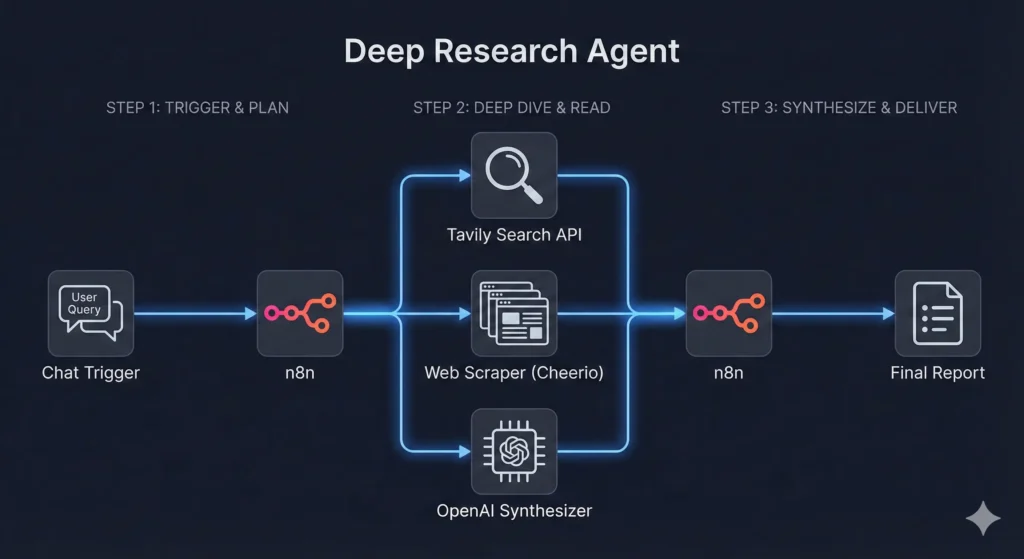
Table 1: The Deep Research Agent Recipe
| Component | The Tool / Ingredient | Function | Cost |
| The Chef (Platform) | n8n | The kitchen where everything happens. It connects the brain to the hands. | Free (Desktop App or Self-Hosted) |
| The Brain (LLM) | GPT-4o or Claude 3.5 | The intelligence. It reads the scraped text, understands it, and writes the summary. | ~$5.00/mo (Pay-as-you-go API) |
| The Eyes (Search) | Tavily API | A special search engine built for robots. It searches the web and returns clean data, not messy HTML. | Free Tier (1,000 searches/mo) |
| The Scraper | Cheerio (n8n node) | The tool that visits a webpage and extracts the text (stripping out ads and nav bars). | Free (Built-in) |
Got your ingredients? Good. Let’s start cooking.
Step 1: The Trigger (Asking the Question)
Every agent needs a wake-up call. In n8n, we call this the Trigger.
The beauty of building your own tool is that you can trigger it however you want. Do you live in Slack? Make a slash command. Do you prefer email? Make it watch for emails with the subject line “RESEARCH:”.
For this guide, we will use the simplest, most powerful method: a Chat Interface.
When you set up an n8n workflow, you can add a “Chat Trigger” node. This gives you a clean, simple web window—looks just like ChatGPT—where you can type your request.
The Goal:
We need to capture your Research Intent.
If you type: “Find me the latest statistics on remote work in 2026,” the agent needs to grab that text and hold onto it. It becomes the “North Star” for the entire workflow.
- Pro Tip: Don’t just pass the raw question to the agent. Add a step that “Refines” the question. If you type “Apple stock,” the agent should be smart enough to ask itself: “Does the user mean the fruit or the tech giant?”
Step 2: The “Eyes” (Setting Up the Search Tool)
Here is the biggest hurdle in automated research: Google hates robots.
If you try to build a bot that simply goes to https://www.google.com/search?q=Google.com and searches, you will get hit with a CAPTCHA immediately. You know the drill—”Select all images containing a fire hydrant.” Robots are bad at that.
To bypass this, we use an API (Application Programming Interface) designed specifically for AI agents. The industry standard right now is Tavily.
Why Tavily?
Standard Google searches return a list of blue links. That is useless to an AI. It needs context.
Tavily returns structured data. It gives you the title, the URL, and—crucially—a clean text snippet of what is on the page. It cuts through the paywalls and the cookie banners so your agent doesn’t get stuck.
The Setup in n8n
- Add an HTTP Request node (or the native Tavily node if available).
- Connect it to your Chat Trigger.
- In the settings, tell it to take your “Research Intent” and pass it to Tavily.
- Important Setting: Limit the results to the Top 5.
- Why? You might be tempted to say “Read the top 100 results!” But reading takes computing power (tokens). Reading the top 5 authoritative sources is usually enough to get 90% of the facts without burning your wallet.
Now, your agent has “eyes.” It knows where the information lives. Next, it needs to go get it.
Step 3: The “Deep Dive” (Scraping & Reading)
This is the step that separates a “Deep Research” agent from a lazy chatbot.
A lazy bot reads the summary Tavily provides. A Deep Research agent clicks the link.
In your n8n workflow, you will receive a list of 5 URLs from the previous step. You need to create a Loop. This tells the agent: “For each of these 5 URLs, do the following…”
The Scraping Logic
Inside the loop, you will use a tool to fetch the website’s content.
We want to extract the “meat” of the article—the <p> (paragraph) tags and the headers (<h1>, <h2>).
The “Junk Filter”:
The internet is messy. If you just grab everything on a page, you will get the navigation menu (“Home, About, Contact”), the footer (“Copyright 2026”), and a dozen ads for weight loss supplements.
Your agent needs to strip this out. In n8n, you can use an HTML Parser node (often called “Cheerio”). You configure it to:
- Keep: The main article body.
- Discard: Scripts, styles, navbars, and sidebars.
Now, instead of a messy webpage, you have clean, plain text. You have the raw data.
A Note on Paywalls:
Your agent acts like a standard web browser. If a site requires a login or a credit card (like the Wall Street Journal), your agent will hit a wall.
- The Fix: You can instruct your agent (in the logic settings) that if the scraped text contains “Please Log In,” it should simply skip that URL and move to the next one. It is better to ignore a source than to hallucinate what it says.
Step 4: The “Synthesis” (Turning Noise into Insight)
At this point in the workflow, your agent has done a lot of work. It has found 5 sources. It has visited them. It has scraped 10,000 words of text.
But you don’t want 10,000 words. You want an answer.
This is where the Brain (the LLM) comes in. You are going to feed all that scraped text into a model like GPT-4o or Claude 3.5 Sonnet.
The secret sauce here isn’t the model; it is the System Prompt.
If you tell the AI: “Summarize this,” it will give you a boring paragraph. You need to give it a persona.
The “PhD Researcher” Prompt
Copy and paste this logic into your AI node:
“You are a PhD-level research assistant. I will provide you with text scraped from 5 different sources regarding the topic: [Insert User Query].
Your task is not just to summarize, but to synthesize.
- Extract Hard Data: Look for numbers, dates, and percentages.
- Identify Conflicts: If Source A says the market is up, but Source B says it is down, point this out.
- Cite Everything: Every claim must have a reference number [1] linking back to the URL.
- Format: Produce an ‘Executive Brief’ with bullet points, a ‘Key Findings’ section, and a ‘Data Table’ if applicable.”
This prompt forces the AI to think critically. It turns the raw text into a structured, valuable asset.
Step 5: The Output (Where the Research Goes)
You have the data. Where do you want it?
The classic mistake is to just have the bot spit the answer back in the chat window. That is fine for quick questions, but this is Deep Research. You want to save this.
In n8n, you can connect the final output to almost anything.
- The “Morning Briefing” Method: Connect a Gmail node. Have the agent email you the report. Imagine waking up to a dossier on your competitor every Monday morning.
- The “Knowledge Base” Method: Connect a Notion or Obsidian node. The agent creates a new page in your “Research” database, pastes the report, tags it, and links the original sources.
- The “Writer’s Block” Killer: If you are a writer, connect it to Google Docs. Have the agent append the research to the bottom of your current draft so you have your facts ready when you start writing.
Advanced: Making It “Smart” (Recursive Research)
Once you have the basic “Search -> Scrape -> Summarize” loop working, you might notice a problem.
Sometimes, the first search isn’t enough.
Let’s say you ask: “Why did the crypto market crash today?”
The agent searches. It finds an article saying: “The market crashed because of the new SEC regulation.”
A basic agent stops there. But a smart researcher asks: “Wait, what is the new SEC regulation?”
This is called Recursive Research.
You can build logic into your n8n workflow that allows the agent to “Think” before it answers.
The Loop:
- Agent performs Search #1.
- Agent analyzes the results.
- Agent asks itself: “Is this information complete?”
- If No: The agent generates a new search query (e.g., “Details of SEC crypto regulation 2026”) and loops back to Step 2.
- If Yes: The agent proceeds to the final summary.
This mimics human curiosity. It allows the agent to go down rabbit holes for you, bringing back a complete picture rather than a surface-level snapshot.
FAQ: Common Questions About Deep Research Agents
Is building a Deep Research agent expensive?
No. The software (n8n) is free if you run it on your laptop. The Tavily search API has a generous free tier (usually 1,000 searches a month). The only real cost is the OpenAI/Claude API usage, which is pay-as-you-go. For a typical research report, you are looking at pennies—maybe $0.05 to $0.10 per report. Compare that to the value of your time.
How is this different from just using ChatGPT Plus browsing?
Control. When you use ChatGPT’s browser, it is a “black box.” You don’t know why it clicked one link and ignored another. You can’t tell it to “Format this as a markdown table and save it to Notion.” With your own agent, you own the pipeline. You can force it to only look at academic sources, or only look at Reddit for sentiment analysis.
Can the agent access paywalled papers?
Generally, no. Your agent behaves like a standard web visitor. If a human can’t see it without a credit card, neither can the bot. However, because it can scan so many sources so quickly, it can often find the same information cited in a public abstract or a news report about the paper.
Conclusion: From Consumer to Commander
We are entering a strange new era of the internet. For the last twenty years, we have been “Users.” We used Google. We used apps. We used search bars. We were the manual laborers of the digital world, digging through data to find gold.
That era is ending.
When you build a Deep Research Agent, you stop being a User and start being a Commander. You stop doing the digging and start directing the operation.
Think about what you could do with those extra two hours a day. You could write more. You could think deeper. You could finally finish that project that has been sitting on the shelf because the “research phase” was too daunting.
The tools are here. The code is free. The recipe is simple.
You can keep drowning in tabs, or you can build a lifeline.
Ready to stop searching?
I have packaged the exact n8n workflow described in this article into a downloadable JSON file.
[Click here to download the ‘Deep Research’ Blueprint], import it into your n8n app, add your API keys, and fire your first automated research mission today.